In this course I liked the book. Head first Object Oriented Analysis and Desing. I think it was a good book with good examples. I learned quite a lot of things that will help me in my professional career.
What I didn’t like
Looking back, I thing I would’ve liked to develop a project throughout the semester. Maybe with the help of the teacher we could’ve develop a project similar to one the teacher had developed in the past. And see how it is done in the real life.
The Test Driven Development (TDD) is a software engineering practice that requires unit tests to be written before the code they are supposed to validate. Coming from the Agile world in which it is a basic practice of the Extreme programming (XP) method, TDD is nowadays recognized as a discipline in its own right that is also used outside the agile context.
TDD Principles
By combining programming, unit test writing and refactoring, TDD is a structuring practice that allows to obtain a clean code, easy to modify and answering the expressed needs which remains the first priority when developing an application. The TDD has 3 phases:
RED. First write a unit test in failure. The impossibility of compiling is a failure.
GREEN. Write as soon as possible the production code sufficient to pass this unit test even if it means allowing the “worst” solutions. Of course if a clean and simple solution appears immediately, it must be realized but otherwise it is not serious the code will be improved incrementally during the refactoring phases. The aim here is to obtain as soon as possible the green bar of success of the unit tests.
REFACTOR. This phase is often neglected but is essential because it eliminates possible code duplications but also makes it possible to make changes in architecture, factorization, presentation… This refactoring concerns both the production code and the test code and must not modify the external behavior of the program, which is materialized by a test execution bar that remains green.
Once a program code is written, it must be tested to detect and subsequently handle all errors in it. A number of schemes are used for testing purposes.
Another important aspect is the fitness of purpose of a program that ascertains whether the program serves the purpose which it aims for. The fitness defines the software quality.
Testing in Object Oriented Systems
Unit Testing
In unit testing, the individual classes are tested. It is seen whether the class attributes are implemented as per design and whether the methods and the interfaces are error-free. Unit testing is the responsibility of the application engineer who implements the structure.
Subsystem Testing
This involves testing a particular module or a subsystem and is the responsibility of the subsystem lead. It involves testing the associations within the subsystem as well as the interaction of the subsystem with the outside. Subsystem tests can be used as regression tests for each newly released version of the subsystem.
System Testing
System testing involves testing the system as a whole and is the responsibility of the quality-assurance team. The team often uses system tests as regression tests when assembling new releases.
Object-Oriented Metrics
Metrics can be broadly classified into three categories: project metrics, product metrics, and process metrics.
Project Metrics
Project Metrics enable a software project manager to assess the status and performance of an ongoing project. The following metrics are appropriate for object-oriented software projects −
Number of scenario scripts
Number of key classes
Number of support classes
Number of subsystems
Process Metrics
Process metrics help in measuring how a process is performing. They are collected over all projects over long periods of time. They are used as indicators for long-term software process improvements. Some process metrics are −
Number of KLOC (Kilo Lines of Code)
Defect removal efficiency
Average number of failures detected during testing
In this week’s mastery topic we’ll talk about verification and validation. We’ll see what each of them mean. What is the difference between these two and why they are often confused with one another.
Verification And Validation:
This steps are involved in software testing. Verification and validation are the processes to check whether a software system meets the specifications and that it fulfills its intended purpose or not. Verification and validation is also known as V & V. It may also be referred to as software quality control. It is normally the responsibility of software testers as part of the Software Development Life Cycle.
Verification
Verification is the process, to ensure that whether we are building the product right i.e., to verify the requirements which we have and to verify whether we are developing the product accordingly or not.
There are several activities in the verification step. Such as: Inspections, Reviews, Walkthroughs
Validation
Validation is the process, whether we are building the right product i.e., to validate the product which we have developed is right or not.
The activities involved in this stage are the following: Testing the software application
Verification vs Validation
These are hugely confused and debated terms in the software testing world. You will encounter all kinds of usage and interpretations of these terms. I’ll try to explain the difference.
The underlying question
Verification: Are we building the product right?
Validation: Are we building the right product?
Difference in objective
They both ensure that it does what it’s supposed to do. However, to verify this they are tested against different criteria. Verification is when you check your proyect’s requirements.Validation is when you check wether you project fulfills the user needs.
It worth noting that these are independent of one another in a project. Your product may pass validation and fail in verification or vice versa.
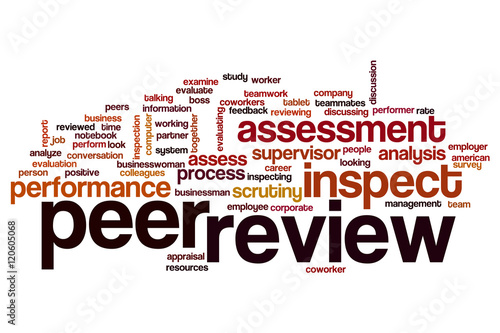
In this week’s blog we’ll talk about peer review, sometimes known as a code review or walkthrough.
What is it?
This is a thorough technical and logical line-by-line review of code. It is usually done in a small module, like a program, subroutine, object, method, etc. Sometimes a meeting can be held to discuss any issues related to the revision.
Why?
One of the main objectives of this process is to identify possible improvements and ensure that business requirements are met.
Advantages, disadvantages
A lot of programmers complain about code reviews because they think it takes a lot of time. This may be true in some cases. Nevertheless, the drawbacks are usually outweighed by the benefits. The main advantages of this process are the following. First of all, it helps reduce bugs. In the long run, all that work will be significantly less if you find those bugs later on when the project is much advanced. That means less rework. There’s also more team communication. All of this helps to improve the team cohesiveness.
by Adobe stock images
How does it work?
The methodology varies from company to company but most methodologys follow this 3 step process consisting of preparation, review, and follow-up. Here’s a look at each step.
Preparation
First, the code being reviewed must be complete, tested by the programmer, and in the programmer’s view, ready for the next step in the development life cycle. The code and other affected project components, such as documentation, test cases, a project schedule, or requirements changes must also be available to the review participants
Review
Reviews are conducted as needed, usually based on the rate of code output. The frequency of individual participation in a peer review depends primarily on the size of the programming team. A team of three programmers might include all three in every review. Larger teams might be able to rotate participation based on experience, skill level, subject matter familiarity, or site-unique factors.
Follow-up
Follow-up provides evidence of the meeting’s success and incentive for the continued use of reviews. The value of future reviews will be degraded if decisions are not enacted, and eventually programmers will view the process as just another waste of time. Follow-up is critical for all participants, especially the programmer. The documentation must be kept in a central location where anyone can reference it.
The first step into writing good code is to make shure that you application works just like the customer wants it to. A good thing to remember is that the customer will never care about use cases and diagrams. They want to see your software acually doing stuff. So no matter how good your list of features and how pretty your diagrams are; if your software doesn’t do what your customer wants, those pretty diagrams aren’t worth anything.
Use case driven development
In this approach you focuse on one scenario in your use case diagram. You must code all the scenarios in one single use case.
Feature driven development
In this approach you start off with a specific feature and before moving on to the next one you complete the previous feature fully.
Which one do I like more?
I like the use case driven development more. I think the FDD is not optimal. I feel like most of the time, the features are all inter-connected. This makes it difficult to code. Of course, if your features are all independent from one another there’s no problem. What I think it’s that most of the time this is not the case. Maybe a few features are independent. But in my short experience the difficult and important features are always dependant on one another.
On this chapter they described a series of design principles. A lot of them were things that we kind of knew but it is really important to keep in mind and acknowledge their importance. The principle that I think it’s the most important one it’s the Don’t Repeat Yourself Principle (DRY). This one is the principle that I’ve broken the most.
My bad practices
When I’m breaking this principle I get the feeling when I’m doing it that it’s something bad. Most of the times it’s pure lazyness. I kinda know what I’m suppose to do to follow this principle. At first I tell myself that I just want to make things work and not worry about fancy things. But when I’m done with the things I wanted to “just work” I’m afraid that if I change something I might break my code. It’s a funny cycle I keep getting myself into.
An example
When I was doing a project with a friend that wasn’t from the school I broke the DRY principle several times. I had to connect to a database and I had to do it from several files. What I was wrongfully doing was that I wrote the information to connect to the database in every file. So I had an options object with the name of the database, password and username in every file. This is wrong in multiple levels. First of all, if I wanted to change the database the I connect to I would have to check in every single file for the name and change it. Secondly, the password was written in a lot of files of my project. If I upload my project to github it would be disastrous. In both cases I need to make a different file where I store the information and export it. And in every file that I need that information I import it. Finally, I would add this specific file to my .gitignore file, so that it is not uploaded to github.
What I should do
What I should strive to do is to start making things right from the very beginning. I think most of us programmers don’t do this because we sometimes feel like we’re not making any progress. It is difficult to do things right from the very beginning because we sometimes don’t know how.
Installing the game was easy. The problem is the Java jdk. In a previous project for my advanced database systems (it’s not “advanced” actually, it’s just non-relational databases) I had to modify my JAVA_HOME path in my system variables. After fixing that I ran the game with no problem.
Version
I played the XP and the waterfall versions.
Gameplay experience
I’ve never heard of a game like this so the experience was unique. I had no idea if what I was doing was good or not. I just went with my gut feelings. It was very fun because all of my classmates were struggling with it.
Difference between XP and waterfall
In the XP mode you had very little options so sometimes you couldn’t do anything except skiping to the next event. On the other hand, in the waterfall version, you had too much freedom. You could fire people, you could lower their wages and you could give them bonuses. I prefer the XP version because the waterfall version overwhelms me with choices.
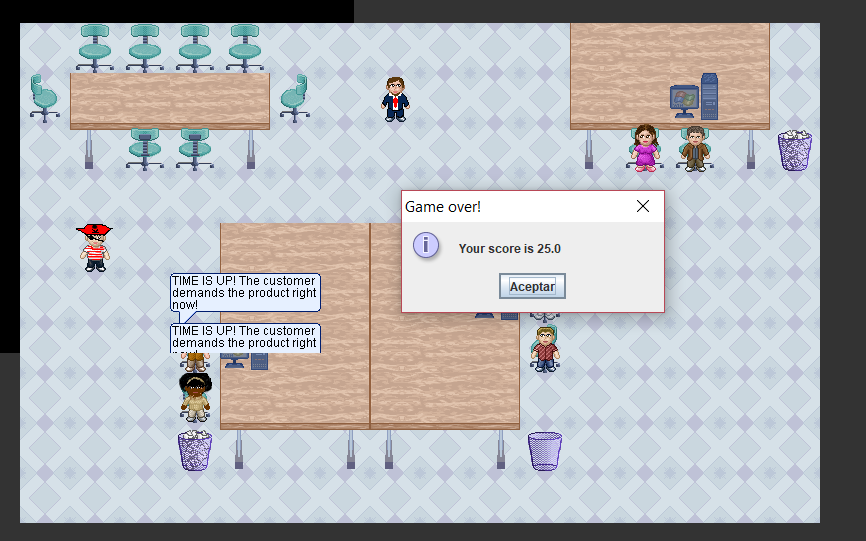
I got a score of 25 in the XP version. I didn’t finish the waterfall version 😦
If you already did the design and draw a class diagram in UML then you’ve already done the hard part. Now you have to follow what you diagram says.
Attributes
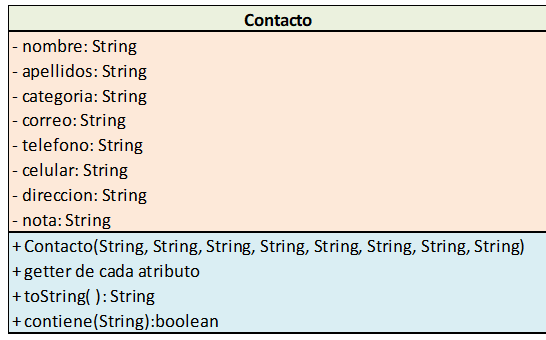
I can use the class diagram that I did for my mid-partial project for my Object Oriented Programming course. At the top we have the attributes of the class Contacto. To turn this into code you have to pay attention to the sign (this will be the acces type) and type variable. If there’s a minus sign you make the attribute private. If there’s a plus sign you make the attribute public. Then you just make it a String if it says that your attribute is a string.
Methods
The acces type rule still holds here so there’s no need to explain it again. What you have to look for is the values the method recieves and the return type. For java these things really matter but for languages like python or javascript it is not that important.
You need to pay attention to the relationship between you classes becuase it directly affects the code. With inheritance you need to specify which class it extends from (if you’re in java). There are also composition and aggregation relationships, when there’s such a relationship you’ll need to create another attribute to the class.
This chapter talks about what to do in big projects when you have alreadey layed out the features. They try to write some use cases but it shows that it is a little bit difficult writing perfect use cases just yet. Insead they write what they call scenarios . These help to actually start writing use cases when you’re not quite ready yet. This chapter also talks a little about risk and how you must shift you implementation in such a way that minimizes risk. They also give you three tips to help you figure out where to start. Especially in these big proyects one can feel overwhelmed. It can be difficult to know where to start.
Where to start
The last chapter they layed out a very complex and big problem. We’ve done a very broad analysis of what the application must do but without getting into actuall code. In this chapter they help you decide where to start first once you’ve described the mayor features. Basically there are three tips that the books gives. Start with what’s essential (duh), start with what you don’t understand , start with what you don’t knowhow to do. The first one can come across as really obvious but it’s important to have in mind. The second what are very self explanatory. If you don’t know how to do something, you should start with that becuase otherwise it can cause you problems in the long run. I’ve experienced this myself. I was in the back-end of the development of a proyect and I didn’t understand how a specific thing worked on the front-end that was relevant for the task. I had to change quite a few things becuase of this afterwards.
Reduce risk
They also talk about a certain key aspect of software analysis. Risk. They say that everything one does in the architectural phase of the project should reduce the risk of the project failing. I can understand why this is very important but I haven’t quite totally understood it. I don’t understant why would that change if you do something first or leave it at the end. If a certain feature is at risk of making your whole project fail what does that have to do with when you do it. If a feature is going to make you fail, it should make you fail wether you do it at the start or at the end right? I don’t know but the book didn’t make it clear.
Scenarios b4 uses cases
When you’re in such a big project like the one in chapter 6 and seven there’s a lot of room for mistakes. And you also feel overwhelmed by the size of the project so it’s hard to go straight into writing use cases. This is probably one of the most useful things of the chapter. To write scenarios of how you’re application will work is useful to start writing use cases.


 Cellar Door Blog