
Categories
Sin categoría

Mastery 06 – UML Part 1

What is it?

UML is a modeling language, these things are mainly used in the field of computer science and enginering for designing models of new pieces of software.

UML

Easily one of the most famous modeling language. UML is short for Unified Modeling language is a standardized modeling language consisting of a set of diagrams. UML is meant to facilitate communication and reduce confusion among project stakeholders. It helps developers in the task of visualizing, constructing, and documenting the artifacts of software systems, as well as for business modeling and other non-software systems.

Why use UML?

Companies now are larger and more complex than ever before, not only that but our code is becoming more and more complex. Companies look for ways to automate the production of software and to improve quality as well as reducing costs. The importance of UML can be boiled down to one work. Comunication. At first one might thing that comunicating isn’t that hard. But someone who has experience in sofware development can tell you how hard it is to communicate even in a small project. The difficulty arises because we must communicate with multiple developers. The UML is important because it can help software developers communicate. We have to use it in a way that helps communication and does not hinder it.

Sequence Diagrams

A sequence diagram, as its name sugests, describes the order in which the interactions between objects take place. Sequence diagrams describe how and in what order the objects in a system function. These diagrams are widely used by businessmen and software developers to document and understand requirements for new and existing systems.

Image result for sequence diagrams.
© Wikipedia.

Class vs Object diagram

At first glance you might thing that they are the same thing. But they are completely different things.

A class diagram depicts which objects your program consists of. So for example. The image below is a class diagram I did for my mid-term Object Oriented Programing class. It represents the Contact class. You can see first you write the parameters of the object. A minus sign stands for private and a plus sign stands for public. The next thing you have is the name of the parameter. Then the type. After the parameters we write the class methods. First we write a plus or a minus sign, like the parameters, then the name of the method. Inside the parenthesis are the parameters it recieves. And after that is the return type.
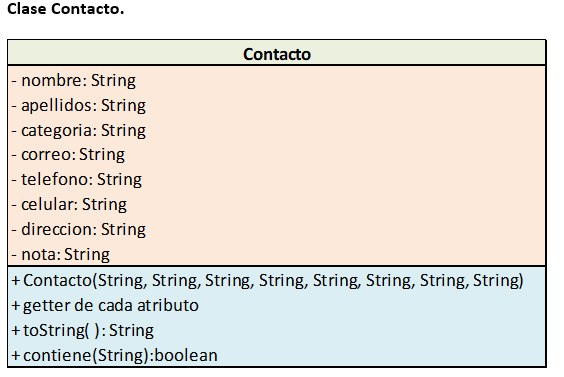
In contrast, an object diagram describes the interaction between the objects, also it can be like a snapshot of your program at a point in time. For example: the diagram below is an example of the class Customer in a certain point in time. It shows the the values of the paramteres of the customer id and the customer name. As well as his different orders.

Image result for object diagram
© creately  https://creately.com/blog/diagrams/uml-diagram-types-examples/#ObjectDiagram

References

UML Diagram Types Guide: Learn About All Types of UML Diagrams with Examples

https://www.sqa.org.uk/e-learning/SDM01CD/page_08.htm

Categories
Sin categoría

HFOOAD Chapter 5 – Flexible

Change – my experience

This chapter is all about change. Sometimes change to your code can be relatively easy. Sometimes, you feel like you broke your application entirely. I think one basic type of change is just refactoring your code. For example: I am currently working in an app. I’m in charge of the API. I use MySQL so I write a lot of queries. Most of them are simple. However, there are some queries that require a lot of other quieres.

In the beginning I only had simple queries, so when a query was succesfully made I made a callback function to retrieve the data from the query. When you have multiple queries this starts to become really messy. A calback function within a callback function within a calback function is not easy to read or to debug. The obvious solution was using async await. This really made the code a lot easier to read and debug.

This chapter

This chapter also dives into class diagrams. It talkes about concepts that are really useful to keep in mind. Such as aggregation. I like the cheat sheet that the book includes. I helps you contextualize UML in an eviromnent that I’m used to work in.

Aggregation

The book uses the concept of aggregation. It is shown when the UML of ricks program is described. To say that something is an agregation of another thing the line with the diamond is used. Agregation is an association. It means that something is made up (in part) of another thing. The example that the book uses is with the instrument astract class. The concept of an abstract class will be explained shortly. An instrument (in ricks program) has assigned to it an InstrumentSpec. Because an instrumetn needs specifications in ricks program. To be precise one instrumentSpec.

Abstract Class

An abstract class is a generalization of a class. It means that it has subclasses that share a common behaviour with eachother. It’s important to note that an abstract class should not be instantiated. It is just used as a common template between classes. The example that the book gives is with the instrument. A mandolin has a lot of similarities with a guitar. So the abstract class from which both classes inherit from is instrument. An instrument alone can’t be an object. You need to specify what instrument.

Categories
Sin categoría

HFOOAD Chapter 4 – The Real World

New kind of thinking

It is really interesting to think about your application in a real world scenario. I am currently developing a mobile app and so far we’ve only tested it in a controled environment. As a developer, you know how your application works and you know the steps to replicate a bug if you do some silly thing and it is the case that you ignore it thinking that your customer wouldn’t be dumb enough to emulate that. But I don’t think that’s the kind of thinking that the book tries to encourage.

Bark recognizer

I really didn’t like the implementation of the bark recognizer. I don’t think the software should be part of that process in the first place. The hardware should be in charge of this task. I think the hardware should only be capable of listening to sounds that have high intensity. That way, only dogs that are close enough to the machine can be recognized.

Delegation

It is good to review the concept of delegation. I understand the concept of delegation. However, the implementations are not always clear to me. Delegation means to pass the work onto another class. This with the purpose of making your code independent of other classes. So changes on one object don’t require changes to other objects.

Categories
Sin categoría

Modeling Languages and Tools

What is it?

A modeling language is mainly used in the field of computer science and enginering for designing models of new pieces of software. It is also used to design systemas and devices. A modeling language uses textual and graphical tools to explain and define these sort of things in order to better explain them better.

Why are they important?

As the functional and operational necessities on these systems are expanding, the difficulty to make them is turning into an important factor. As an outcome, these kinds of systems may only be able to be made by the unified effort of people and by the division of labour. Reducing this complexity is very important to succesfully developing whatever system you want.

UML

Easily one of the most famous modeling language. UML is short for Unified Modeling language is a standardized modeling language consisting of a set of diagrams. UML is meant to facilitate communication and reduce confusion among project stakeholders. It helps developers in the task of visualizing, constructing, and documenting the artifacts of software systems, as well as for business modeling and other non-software systems.

References

https://www.visual-paradigm.com/guide/uml-unified-modeling-language/what-is-uml/

http://www.informit.com/store/unified-modeling-language-user-guide-9780321267979

Categories
Sin categoría

The Cathedral and the Bazaar

‘Real’ Programmers

The author sounds like a stereotypical old man who thinks everything good is from his generation and everything else is just garbage. This is my first impression of the essay. However, it’s difficult to criticize this macho mentality because back then it was really hard. The story of Seymour Cray is amazing. To program an Operating System on your own is a feat in and of itself. But without errors is just unheard of.

The Early Hackers

It’s really interesting to see the history of the word hacker. Right now the word has a really skewed meaning that hollywood films gave them. It’s also interesing that research in AI dates back to the 1980s.

It’s also intersting to know a little bit more about LISP. I’ve heard some things about this programming language and it’s intersting for me to know more about because it really was (and still is) an important programming language

The Rise of Unix

This chapter talks a lot about things that I actually know. In the previous chapter there was a lot of talk about ITS and other computers from the MIT, they talk about how big and famous these are but I have not heard about none of those machines. However, in this chapter they talk (obviously) about the ‘C’ programming language. I really like that they talk about C because I can relate it with my Operating Systems course. The Operating System that we are using is compiled also in C.

The End of Elder Days

This chapter was really boring. Nothing in the chapter really captured my attention. The only cool thing about it is the recursive acronym. UNG. I’ve never heard about a recursive acronym.

The Great Web Explosion

It’s interesting that in this chapter the focus is the rise of the internet as we know it today. It feels like it was a long time ago but Amazon was killing it by 1999 Amazon had 1.6 billion dollars in revenue.

References


Categories
Sin categoría

HFOOAD Chapter 3 – Embrace Change

My experience with change

On this chapter we saw how requirements ultimately change. This is an inevitable part of software development. I’ve been developing an app this winter and I’ve seen how much the requirements have changed, even before releasing the app. This happened to me when I realised that one of the requirements conflicted with another requirement. That’s when I decided to call my friend who was responsible for the app and asked him about it. He decided to change requirements that we have already established. Then I had to change a lot of what I’ve made.

Alternate paths

I liked the “interview” of the Alternate path. I had the same thoughts when I was reading the use case. If the bark recognizer opens the door for them, why bother with the alternate path of the remote control? But it is true that without that alternate path the use case would feel incomplete . The analogy with the credit card use case is very good. Because just like the credit card, the bark recognizer can fail. To be solely dependent of the bark recognizer doesn’t make the program robust. So it makes sense to have that alternate path that takes care of that potential problem.

Retrieved from https://www.bridging-the-gap.com/what-is-a-use-case/

Categories
Sin categoría

Mastery 03 – Use Cases

What is a use case?

A use case is a description that lays out the interaction between the user and the piece of software in question. A use case details the a specific task that your program should do. Use cases describe the What of your application. A good practice is to write a use case for every software requirement that your software must comply with.

What must a use case have?

First of all, according to the book. A use case must add value to your application. It should define something that is integral to your program. Second of all, the use case should have an external trigger. Something should jump start each use case. Lastly, the use case should have a clear start and an ending. A use case usually comes as a series of sequential steps.

Why are they important?

A use case can reveal holes in your software requirements. Because a use case requires you to be specific and list all the steps needed to accomplish a task; it helps you to notice certain missing requirements. It can also make you found out about things that your customer forgot to tell you.

Scenarios

A complete path through a use case from the first step to the last is called a scenario. A scenario might have multiple paths. However, they all end in the same user goal.

Categories
Sin categoría

HFOOAD Chapter 2 – Give Them What They Want

The requirements

This is a topic that we’ve seen in our introductory course on Software. It is a really big and important concept that all sofware engineers need do know. In projects that I’ve had the requirements are probably one of the hardest things to get right. Most of the time we come back and make some adjustments.

The customer doesn’t really know what he wants

This is something that makes laying out the requirements very difficult. How can the developer define the requirements when even the customer doesn’t know them either. Maybe that’s why most of the time Apple doesn’t listen to its customers altogether.

The use cases

This is also a topic we saw in an earlier class. Although the book covers three things that a use case must have that I didn’t know about. Basically the use case must add value to the product. Have a clear starting and stoping point and finally the initiator must be an outside trigger.

Another thing that captured my attention was that the use cases actually help to find things that the customer didn’t tell you. That is very useful. Writing use cases can also find holes in your requirements. In conclusion use cases are very important for the product to fulfill the customer’s needs.

Categories
Sin categoría

Mastery 02 – Unified Software Process

What is it?

The Unified Software Development Process is a very popular standard software development proccess based in UML. It is a use-case and risk driven proccess. It is iterative and incremental. In each iteration various processes are made.

The Iterations

Every single iteration is like a mini-project. It contains different steps. These steps are the lyfe cycles that we covered in the Mastery 01. Planning, Design, , implementation, Test and deploy. The final result is reached through a sequence of iterations.

Every iteration may contain all of those steps, in each iteration the emphasis of each step varies.


© Zuehlke Enginereing, http://www.zuehlke.com

Increments

When an iteration ends, the result of said iteration is called an increment. An increment is the difference between the result of the previous iteration, with the next iteration.

Phases

USDP consist of 4 phases. The number of iterations within each phase varies and is dependant of the size of the project. The 4 phases are the following: Inception, Elaboration, Construction and Transition.

Workflow

As we’ve discussed, in each phase the emphasis of work varies. In the following graph we can see this.


© Zuehlke Enginereing, http://www.zuehlke.com

On the right we have the steps of the life cycle of software development that we’ve already talked about. At the top there are the phases of the Unified Software Process. The line represent the amount of work that is put on each phase. As we can see, in the inception phase, the requirements and the analysis is the most important aspect. These steps become more important in the Elaboration phase. At the end of this phase the importance of design peaks. In the construction phase the implementation is the focus of the work. At the end of this phase testing peaks. In the transition phase, testing is the most important thing.

Inception

In this phase the feasibility of the project is established. The key requirements are laid out. In this phase the critical risks of the project are defined.

Elaboration

In this stage the risks are heavily scrutinized. The quality attributes are defined. The use-cases are written. A very detailed plan for the construction phase is worked on. Another important goal of this phase is the formulation of the resources, time, staff and cost.

Construction

This is probable one of the most time consuming phases. In this phase the use-cases should be completed. Here, most of the time is spent on the implementation.

Transition

As we’ve mentioned erlier. This stage is all about refinement and getting ready for deployment. Bugs are fixed. Defects are corrected. Another imporant thing is the user manuals and the documentation.

References

This information was retrieved from The UCL Department of Computer Science http://www0.cs.ucl.ac.uk/staff/ucacwxe/lectures/3C05-01-02/aswe5.pdf

Categories
Sin categoría

Mastery 01 – Life Cycles

The Life cycle, also known as life cycle of software development (LCSD) is the procces that a piece of sofware goes through. In this section I’ll talk about the different stages of the LCSD.

1. Planning

This is the first stage. On this stage the requirements are layed out. The software requirements are very important, since the sofware is going to be based on this list of requirements. These are what the application needs to be able to do. They are usually expressed as a user case. For example; the user should be able to make an account. The user should be able to log in. The user should be able to log out.

2. Design

This stage takes the requirements listed in the previous stage and begins to plan the product. Things like the layout are planne. The color sheme is also agreed upon on this stage. This part may be overlooked as uninportant. But the color sheme can say a lot about the company and the product. In this stage the programming languages are also defined. The frameworks are also a big part of this stage. One big question could be what type of data base to use. Relational or Non-relational. And if one choses a non-relational database we still have options on what databes management system to use. MongoDB and Cassandra are good options with different advantages and disadvantages.

3. Implementation

This is probably the one that most of us jump straight into and find the most fun. The programmers will start to write code. The designers start to plan the user interface. In this stage one may realise that something in the earlier stages of the cycle was not planned correctly and go back and change things accordingly.

4. Testing

This is a very important stage. Problems and bugs are searched in this stage. It’s important to rigorously test because some flaws can cost the company a lot of money. On this stage the requirements are checked to see if they were met.

5. Deploy

On this stage the servers will be ready to be installed. This stage includes setting up the links and the data bases. In this stage the application goes live to the users.

6. Maintenance

On this stage we need to maintain the servers. We need to see that the users are not loading the servers and bringing down the system. Maybe we need to make larger servers or larger databases. There’s a lot of things that go in this stage but it’s basicaly about keeping the product functional

Design a site like this with WordPress.com
Get started